


How to fill out the Signant form
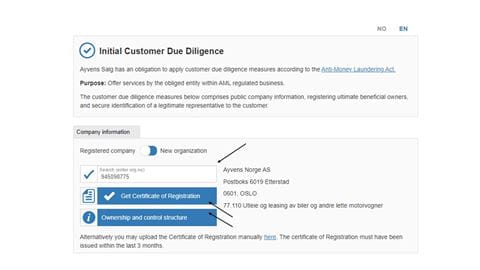
- 1.Enter the company's organization number, and the information registered in the Brønnøysund Register will be retrieved automatically.
- 2.It is important to click on "Retrieve the company certificate from BRREG." This will automatically include the organizational chart with the company's ownership structure as an attachment at the bottom when signing.
- 3.Click on "Ownership and control structure" to download the company's organizational chart with ownership and structure. This must be downloaded and signed by the rights holder.
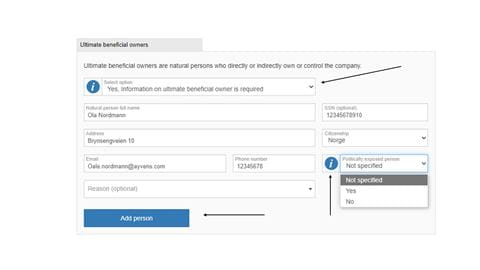
- 1.Open the window and select "Yes, beneficial owners must be disclosed."
- 2.Fill in the Name, Date of Birth, Address, Email, Phone Number, and check whether the person is a politically exposed person or not.
- 3.If there are multiple beneficial owners, click "Add new beneficial owner" to repeat the process above.
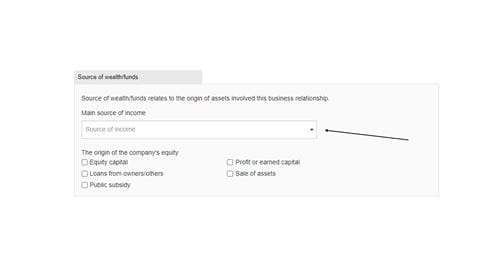
- 1.
Click on the dropdown menu for "Source of Income."
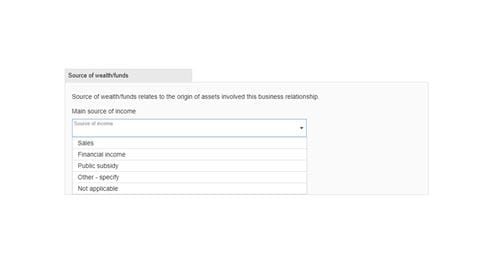
- 1.Select the source of income that applies to your company.
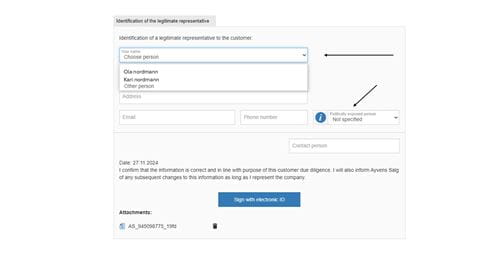
- 1.Click on the dropdown menu. Since the organization's registration number has been entered, information about who is authorized to sign on behalf of the company has been retrieved automatically.
- 2.Select the correct person. If the person's name is not listed, click on "Other person."
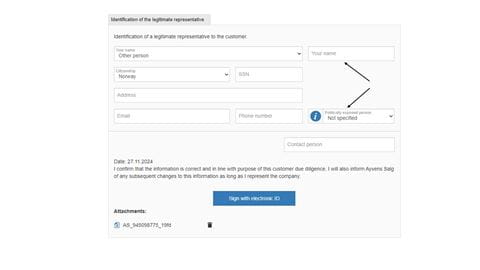
- 1.You will then be able to enter the name of the correct person.
- 2.Whether you select a name already listed or enter it manually, you must fill in the contact information.
- 3.The attachments retrieved when you clicked "Retrieve company certificate from BRREG" have been added as attachments at the bottom. You can see this at the bottom of the page.
- 4.Once everything is filled out, sign with an electronic ID.
- 5.If the authorized signatory cannot use BankID, please use the identification form provided here.