



Hero-electric-10

My Ayvens Fleet

All you need on just one portal.

Do you ou need to access information about your company's cars? Or update a vehicle's driver data? You no longer need to wait for tomorrow to have the information or place the request you need today.

You can now access all the information you need online via your web browser 24/7. No need to install software.

With My Ayvens Fleet you can personalise panels and data, build reports and add your preferred reports to favorites. You can also access the request area, available 24 hours a day, for topics related to the contract or services for the driver.

GET ACCESS TO MY AYVENS FLEET

Discover what you can do with this tool:
    Operacoes_carregamentos

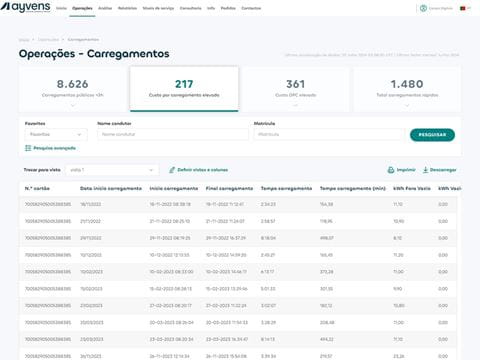
    Operations

    View indicators and get detailed information about cars contracted:

    • Fleet • Renewals and orders • Accidents and damage • Maintenance and repairs • Fuel • Tolls and parking

    Create your own reports by adding new columns and layouts. You can download the file in Excel if you want.
    Analise_Abastecimentos

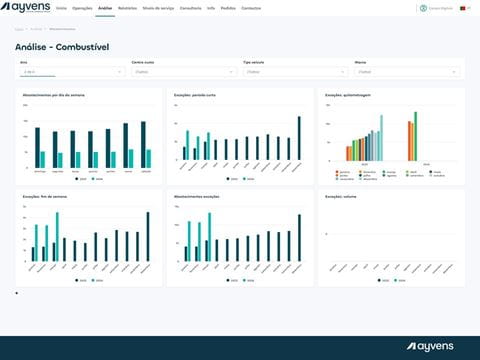
    Analysis

    Analyse the data about your cars:

    • Fleet • Fuel consumption • Environmental impact • Total fleet cost • Maintenance and repairs

    Choose and organise the graphics you want to view. Filter results according to year, cost centre, vehicle type or make. The data in each chart can be exported to Excel.
    Relatorios_Abastecimentos

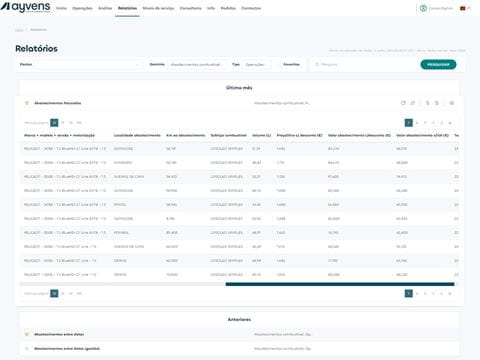
    Reports

    Access pre-defined reports by topic or type, search using keywords, or select the reports you use most, as favorites.

    When you subscribe to a report, you can create alerts, to access a specific report regularly, or if you need to know when relevant changes occur.

    When you subscribe to a report, you will be emailed a direct download link to it (according to the frequency defined, or when there are changes).
    Consultoria

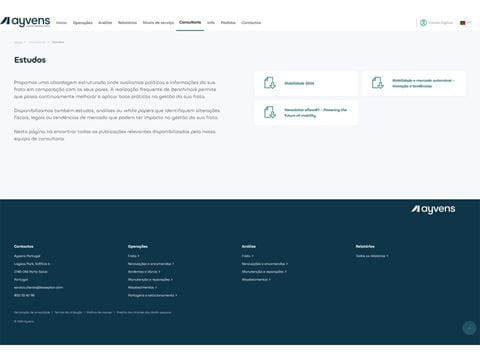
    Consulting

    Discover the studies produced by our Consultancy team.

    You can consult studies, analyses and reports about tax and legal changes and market trends, that could impact the management of your fleet and your business.

    Get a faster service with the My Ayvens Fleet requests area 

    Available 24 hours a day, it allows you to place different types of service requests and puts you in control of the service, helping you to improve efficiency and productivity levels in just a few clicks.

    ZipperGroupofwomenlookingattablet2x

    How it works? 

    • Check
      After logging into My Ayvens Fleet, navigate to the “Orders Area” where you will find a form.
    • Check
      Fill out the form and click "Submit". You will see a notification confirming the order submission and you will receive an email.
    • Check
      An agent will manage your request in accordance with the rules of your contract.
    • Check
      Once your service request has been processed - or if we need more information - we will contact you.
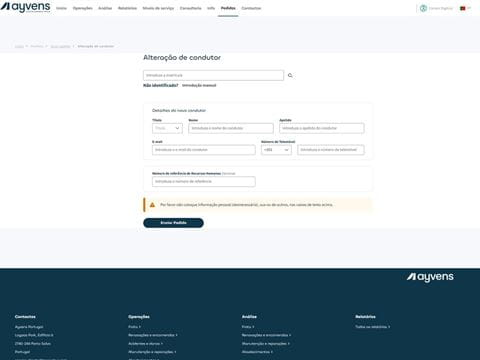
    Pedidos

    Available requests: 

    Contract: • Change the driver of a vehicle • Receive cost estimate for early termination • Transfer vehicle between Cost Centers • Request a copy of the invoice • Join electronic invoicing • Add Purchase Orders (PO) for contracted and non-contracted services

    Driver services: • Update a driver's personal data • Request or return a replacement vehicle • Schedule vehicle maintenance • Report a vehicle accident or damage
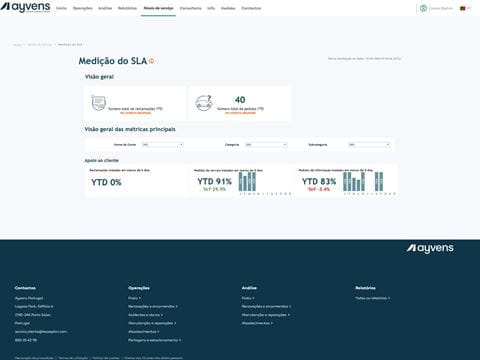
    Niveis_servio

    Service levels

    "Service Levels" menu, now available in My Ayvens Fleet, allows an overview of all indicators.

    Now, it is possible to consult volume, average time and other indicators, related to inquiries, service requests and complaints.

    1. Don't have access to My Ayvens Fleet yet?

      Get your access now.

      If you already have access to My Ayvens Fleet, log-in and access the data about your fleet

    About the My Ayvens Fleet App

    Is access to the My Ayvens Fleet app free? Yes. It is a free app available to Ayvens customers and fleet managers. Manage your contracts and drivers through My Ayvens Fleet: create reports and custom views, analyze trends, access service levels, and plan for the future. Request access now at [Request access to My Ayvens Fleet](targetSelf:/en-pt/services-and-faq/my-ayvens-fleet/request-my-ayvens-fleet-access/)Can anyone access the app? This app is specifically designed for Ayvens fleet managers and customers.What services does My Ayvens Fleet offer me? My Ayvens Fleet is an online tool that simplifies the management of your contracts, vehicles, and drivers, giving you greater autonomy and control. Through the provision of reports, a 24/7 request portal, and a collection of studies, analyses, or white papers on tax and legal changes or market trends impacting fleet management, produced by our consulting team. You can also select the most relevant management indicators and customize reports—create new reports, bookmark favorites, or subscribe to receive them via email. Request your access now at [Request access to My Ayvens Fleet](targetBlank:/en-pt/services-and-faq/my-ayvens-fleet/request-my-ayvens-fleet-access/)I’m waiting for my vehicle to be delivered. Can I request access and use the app? The app is available as soon as you’ve placed an order and are waiting for your vehicle to be delivered. You can request access to My Ayvens Fleet at [Request Access to My Ayvens Fleet ](targetSelf:/en-pt/services-and-faq/my-ayvens-fleet/request-my-ayvens-fleet-access/)and track all the details of your order. Once your vehicle is delivered, you can manage this contract and vehicle, as well as all others in the fleet, through management dashboards and reports, place orders, or check service levels in My Ayvens Fleet.

    Access

    What information do I need to request access? To create an account on the My Ayvens Fleet app, you must request access at “Request Access to My Ayvens Fleet” and verify your identity by entering your Name, Tax ID, Email, and Mobile Phone Number. You will receive a confirmation and welcome email as soon as your user account is created. Welcome to the My Ayvens Fleet app!I forgot my password; how can I regain access? Whenever you forget the password you set, simply enter your username (your email address) on the home screen and click “Log In.” On the next screen, click “Forgot your password?” and then “Send email>”. After receiving our recovery email, click the link and set a new password.

    Using the App

    How do I create a custom report in My Ayvens Fleet? 1. After logging in, select “Operations” followed by the topic for which you want to generate the report—Fleet, Renewals or Orders, Accidents and Damage, Maintenance and Repairs, Refueling, Loading, and Tolls and Parking. 2. At the top of the page, you’ll find indicators and a set of filters and search fields that allow you, for example, to search by license plate or date. 3. At the bottom of the page, you can select the data you need under “Define Views and Columns” and save this view with the name of your choice. 4. You can also drag the report columns into the order you prefer. 5. To retrieve data in the report, click on the selected indicator or filter and then on “Search.” 6. The detailed data will be displayed at the bottom of the page in a table. You can download the data to Excel. 7. Whenever you log in, this report will be available in your view, on the same page where it was created. [Log in now](targetBlank:https://fleet.ayvens.com/pt-pt/) and create a custom report. How does the order section work in My Ayvens Fleet? 1. After logging into My Ayvens Fleet, navigate to the [“Orders”](targetBlank:https://fleet.ayvens.com/pt-pt/pt/page/pedidos-novo) section and select the relevant category. 2. Fill out the form and click “Submit.” 3. An agent will follow up on your request. 4. As soon as your request is processed—or if we need more information—we will contact you. 5. Whenever you place a request in My Ayvens Fleet, you can track its status on the [“History”](targetBlank:https://fleet.ayvens.com/pt-pt/pt/page/pedidos-historico) page, where you’ll find all requests made in the app. [Log in now](targetBlank:After logging into My Ayvens Fleet, navigate to the “Orders” section and select the relevant category. Fill out the form and click “Submit.” An agent will follow up on your request. As soon as your request is processed—or if we need more information—we will contact you. Whenever you place a request in My Ayvens Fleet, you can track its status on the “History” page, where you’ll find all requests made in the app. Log in now and explore the requests section.) and explore the requests section. Where can I find out more about the level of service I’ve received since the beginning of the year? The Service Levels feature in My Ayvens Fleet provides you with an overview of all service metrics—including volume, average response time, and more—related to the requests (for information and service) and complaints you’ve submitted to us over time. 1. Once you’ve logged into My Ayvens Fleet, select [“Service Levels”](targetBlank:https://fleet.ayvens.com/pt-pt/pt/page/niveis-de-servico) 2. On this page, you’ll see an overview of some service metrics since the beginning of the year. 3. You can also view metrics for [“Requests”](targetBlank:https://fleet.ayvens.com/pt-pt/pt/page/niveis-de-servico-pedidos) and [“Complaints”](targetBlank:https://fleet.ayvens.com/page/niveis-de-servico-reclamacoes) on each page. 4. You can apply various filters, such as time period or category. 5. You can also get more detailed information about all requests and complaints over time on the [“Details”](targetBlank:https://fleet.ayvens.com/page/niveis-de-servico-detalhes) page, and you can download the results to Excel. [Log in now](targetBlank:https://fleet.ayvens.com/pt-pt/) to view detailed information about requests and complaints. Where can I find the most recent studies from the consulting firm? Stay up to date on tax and legal changes or market trends through the consulting firm’s studies available on the [“Studies”](targetBlank:https://fleet.ayvens.com/pt-pt/pt/page/estudos) page. [Log in now](targetBlank:https://fleet.ayvens.com/pt-pt/) to view and download the studies.